|
|
|
|
|
Film shrunk by more than about 0.3% cannot be safely printed on a normal printer without some modifications, otherwise, film slippage occurs. Wide ranges of modifications exist falling into one of the following categories.
- Shorter than normal pitch sprocket drive rollers fitted in place of normal rollers. This might require 25 new rollers in the case of a modern Rotary Contact Peterson Immersion gate printer! This would handle a narrow range of shrinkage, approximately 0.4% to 0.9%. Another set of 25 would be required for shrinkages that are more serious.
- Worn down or filed down teeth on sprocket drive rollers or pull down claw mechanisms [e g on old printers] work better on shrunk film and may not actually fit new film!
- Replace the pull down claw mechanism of a step printer [optical or contact] with a special short pull down [e g Oxberry] or a variable pull down mechanism [Debrie TAI].
- Register pins on step printers can be filed down or removed so that the pin will not attempt to engage in a position where the perforation is not quite aligned.
- Some printers are sufficiently imprecise that they can handle a wider range of film pitches than others and the Flat-bed contact printer falls into this category
In modern films, the position of the frameline is strictly standardized, which means that it falls always mid-way between two perforations.
As many other standards in film technology history, this is a somehow
recent development, dating sometimes during the 30's, when the sound and
the Academy aperture were imposed all over the world. However, before that
date frameline position can vary considerably. It is not uncommon to find
prints where the frameline corresponds exactly with one perforation.
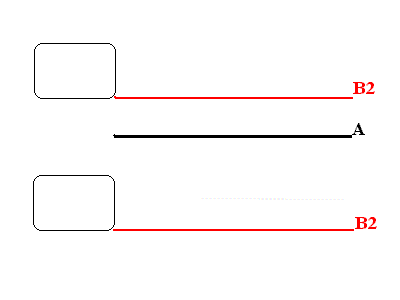 In
this drawing, you can see the two perforations, with the standard frameline
position (in black, A). The two red lines (B1 and B2) show the range of
different positions a non standard frameline can take. You can find your
frameline in any position between the two red lines. In
this drawing, you can see the two perforations, with the standard frameline
position (in black, A). The two red lines (B1 and B2) show the range of
different positions a non standard frameline can take. You can find your
frameline in any position between the two red lines. |
This means that we must pay a great care and attention in setting the
printer so that we copy (or print) the whole area of the frame. Optical
printers can adjust the frame position (both horizontally and vertically)
by shifting the position of the lens. However, this implies that the projecting
head of the machine can handle a frame, which is positioned in a non-standard
way in relationship with the perforations. This is an important feature
that all archival printers must have.
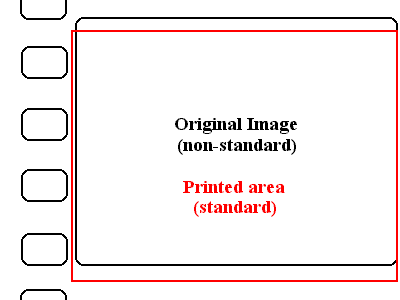 In
this drawing, you can see the effect of a wrong positioning of the rack
while printing can produce. In
this drawing, you can see the effect of a wrong positioning of the rack
while printing can produce.
In this case, you see the original picture area (in black); when you print this using a standard rack position, you obtain the printed area (in red). As you can see, the two do not correspond exactly. Therefore, in each frame you will obtain two frame lines and an area, which contains a part of the previous frame (these are the areas delimitated by the red and the black line on top and on bottom of the image. |
| As you can see, in this negative of the silent era, the frameline is not in the standard position, i.e. exactly mid-way between two perforations. |
In continuous contact printers, the frameline position is not so critical, because by copying the film as it is, continuously, we will simply obtain a copy having a non standard position of the frameline. The rack can be then adjusted in projection.
When we work on a step contact printer (either wet or dry) this must be equipped with a device that allows the correction of the rack. This is of major importance whenever we print archival materials. In addition, in this case the result will be a copy having a non-standard frameline position, which is not problematic in itself during projection.
A quite common problem we will have to face is the fact that the frameline position can change dramatically from scene to scene in a silent film. In facts, the lack of standardization lead to the fact that different cameras could have a different frameline position, or that intertitles (this is the most common case) have a position which is very different from the one of the picture. In this case, we must carefully check the film before printing and adjust the frame whenever it changes. To this purpose, modern optical printers are equipped with viewers or built-in video cameras (e.g. as Debrie TAI printer), which allow the operator to check the frameline position while printing.
SpeedPrinting speed can be also a variable to be kept into consideration while printing old archival materials.
As we discussed already, different types of printers (continuous, step, optical or contact) have usually different printing speeds, which depend on their design or on their inherent characteristics. Some printers are also designed so that they can be run at different speeds. Debrie TAI can vary speed from 5 to 25 frames per second; B&H Model C had two different speeds (60 or 180 feet per minute), etc.
In this case, the speed can play a role in several ways:
- first of all, higher speeds are not advisable for fragile or very shrunk materials: the film can break more easily, and when t happens, it takes too long to stop the machine, meaning that a longer section of film is damaged;
- secondly, a higher speed with shrunk or fragile archival materials can result in an increased unsteadiness.